Overview
The logical structure of an verifyImages rule is shown below:
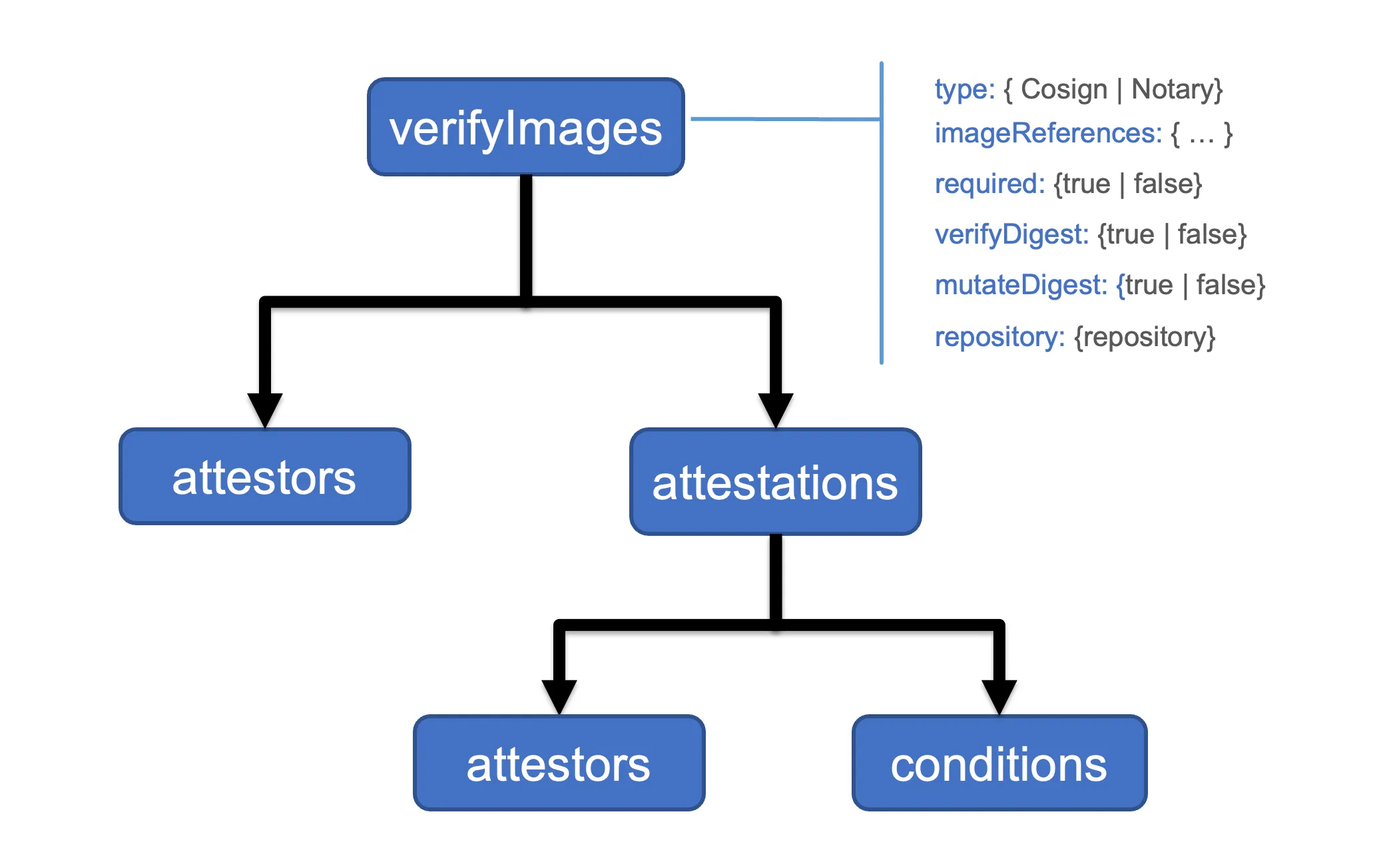
Each rule contains the following common configuration attributes:
type: the signature type. Sigstore Cosign and Notary are supported.imageReferences: a list of image reference patterns to matchskipImageReferences: a list of image reference patterns that should be skipped.required: enforces that all matching images are verifiedmutateDigest: converts tags to digests for matching imagesverifyDigest: enforces that digests are used for matching imagesrepository: use a different repository for fetching signaturesimageRegistryCredentials: use specific registry credentials for this policy.
A verifyImages rule can contain a list of attestors or authorities used to check the attached image signature. The type of attestor supported will vary based on the tool used to sign the image. For example, Sigstore Cosign supports public keys, certificates, and keyless attestors.
A verifyImages rule can contain a list of attestations i.e., signed metadata, to checked for the image. The nested attestations.attestors are used to verify the signature of the attestation. Any JSON data in an attestation can be verified using a set of attestations.conditions.
The rule mutates matching images to add the image digest, when mutateDigest is set to true (which is the default), if the digest is not already specified. Using an image digest has the benefit of making image references immutable and prevents spoofing attacks. Using a digest helps ensure that the version of the deployed image does not change and, for example, is the same version that was scanned and verified by a vulnerability scanning and detection tool.
The imageVerify rule first executes as part of the mutation webhook as the applying policy may insert the image digest. The imageVerify rules execute after other mutation rules are applied but before the validation webhook is invoked. This order allows other policy rules to first mutate the image reference if necessary, for example, to replace the registry address, before the image signature is verified.
The imageVerify rule is also executed as part of the validation webhook to apply the required and verifyDigest checks:
- When
requiredis set totrue(default) each image in the resource is checked to ensure that an immutable annotation that marks the image as verified is present. - When
verifyDigestrule is set totrue(default) each image is checked for a digest.
The imageVerify rule can be combined with auto-gen so that policy rule checks are applied to Pod controllers.
The attestors declaration specifies one or more ways of checking image signatures or attestations. The attestors.count specifies the required count of attestors in the entries list that must be verified. By default, and when not specified, all attestors are verified.
The attestors.count specifies the required count of attestors in the entries list that must be verified. By default, and when not specified, all attestors are verified.
The imageRegistryCredentials attribute allows configuration of registry credentials per policy. Kyverno falls back to global credentials if this is empty.
The imageRegistryCredentials.helpers is an array of credential helpers that can be used for this policy. Allowed values are default,google,azure,amazon,github.
The imageRegistryCredentials.secrets specifies a list of secrets that are provided for credentials. Secrets must be in the Kyverno namespace. Starting with Kyverno 1.18, a namespace/name notation is also accepted to reference secrets from other namespaces.
Namespaced Secrets (1.18+)
Section titled “Namespaced Secrets (1.18+)”Prior to 1.18, all secrets in imageRegistryCredentials.secrets had to live in the Kyverno namespace. Starting with 1.18, you can use namespace/name notation to reference a secret from any namespace:
- Plain name (e.g.,
my-registry-secret): Kyverno looks for the secret in the Kyverno namespace (unchanged behavior). namespace/name(e.g.,production/my-registry-secret): Kyverno reads the secret from the specified namespace.
Example ClusterPolicy using a namespaced secret:
apiVersion: kyverno.io/v1kind: ClusterPolicymetadata: name: verify-images-productionspec: rules: - name: verify-image match: any: - resources: kinds: - Pod verifyImages: - imageReferences: - 'registry.example.com/production/*' imageRegistryCredentials: secrets: - 'production/registry-pull-secret' attestors: - entries: - keys: publicKeys: | -----BEGIN PUBLIC KEY----- ... -----END PUBLIC KEY-----Pod imagePullSecrets (1.18+)
Section titled “Pod imagePullSecrets (1.18+)”Starting with Kyverno 1.18, Kyverno automatically uses the imagePullSecrets defined in the pod spec as registry credentials when verifying images. No additional policy configuration is required — Kyverno reads spec.imagePullSecrets from the pod being evaluated and uses those secrets to authenticate with the registry.
For example, if a pod carries its own pull secret:
apiVersion: v1kind: Podmetadata: name: my-app namespace: team-aspec: imagePullSecrets: - name: team-a-registry-secret containers: - name: app image: registry.example.com/team-a/app:latestKyverno will automatically use team-a-registry-secret from the team-a namespace when verifying the image, without any imageRegistryCredentials configuration in the policy.
RBAC Requirements for Namespaced Secrets
Section titled “RBAC Requirements for Namespaced Secrets”When imageRegistryCredentials.secrets references secrets outside the Kyverno namespace, or when Kyverno reads pod imagePullSecrets (which live in the pod’s namespace), the admission and background controllers need get access to secrets in those namespaces.
Create a Role and RoleBinding in each target namespace:
apiVersion: rbac.authorization.k8s.io/v1kind: Rolemetadata: name: kyverno-secret-reader namespace: productionrules: - apiGroups: [''] resources: ['secrets'] verbs: ['get', 'list', 'watch']---apiVersion: rbac.authorization.k8s.io/v1kind: RoleBindingmetadata: name: kyverno-secret-reader namespace: productionroleRef: apiGroup: rbac.authorization.k8s.io kind: Role name: kyverno-secret-readersubjects: - kind: ServiceAccount name: kyverno-background-controller namespace: kyverno - kind: ServiceAccount name: kyverno-admission-controller namespace: kyvernoFor pod imagePullSecrets, repeat this Role and RoleBinding in every namespace where pods with imagePullSecrets will be deployed.
For additional details please reference a section below for the solution used to sign the images and attestations:
Limitations
Section titled “Limitations”Variables in imageReferences
Section titled “Variables in imageReferences”The imageReferences field does not support variable interpolation (e.g., {{ }} syntax). Only static strings or predefined lists should be used.
Incorrect Usage (Using Variables – Not Allowed)
Section titled “Incorrect Usage (Using Variables – Not Allowed)”verifyImages: - imageReferences: ['{{ parse_yaml(allowedregistryprefixes.data.allowedregistryprefixes) }}']This will result in a validation error because variables are not allowed in imageReferences.
Correct Usage (Using Static Values – Allowed)
Section titled “Correct Usage (Using Static Values – Allowed)”verifyImages: - imageReferences: - 'myregistry.com/app-image:v1' - 'myregistry.com/app-image:v2'Here, only explicit, static image references are used, which is allowed.
Other Fields Where Variables Are Not Allowed
Section titled “Other Fields Where Variables Are Not Allowed”In addition to imageReferences, the following fields do not support variable interpolation and must be defined with static values:
match.resources.kindsexclude.resources.kindspreconditions.allpreconditions.any
Incorrect Usage (Using Variables – Not Allowed)
Section titled “Incorrect Usage (Using Variables – Not Allowed)”rules: - name: restrict-deployment-kinds match: resources: kinds: - '{{ request.object.kind }}'Why is this incorrect?
match.resources.kindsmust contain static resource kinds (e.g.,Pod,Deployment).- Dynamic interpolation using
{{ request.object.kind }}is not supported.
Correct Usage (Using Static Values – Allowed)
Section titled “Correct Usage (Using Static Values – Allowed)”rules: - name: restrict-deployment-kinds match: resources: kinds: - Deployment - StatefulSetWhy is this correct?
- Only predefined, static resource kinds (
Deployment,StatefulSet) are used.
Why Are Variables Not Allowed in These Fields?
Section titled “Why Are Variables Not Allowed in These Fields?”Kyverno requires these fields to be static to ensure policy validation and enforcement remain deterministic and efficient. Allowing variables in these fields could introduce unexpected behavior, making policy evaluation unreliable.
Image verification requires multiple network calls and can be time consuming. Kyverno has a TTL based cache for image verification which caches successful outcomes of image verification. When cache is enabled, an image once verified by a policy will be considered to be verified until TTL duration expires or there is a change in policy.
In Kyverno’s admission controller deployment, users can configure the cache using the following flags:
imageVerifyCacheEnabled: Enable a TTL cache for verified images. Default is true.
imageVerifyCacheMaxSize: Maximum number of keys that can be stored in the TTL cache. Keys are a combination of policy elements along with the image reference. Default is 1000. 0 sets the value to default.
imageVerifyCacheTTLDuration: Maximum TTL value for a cache expressed as duration. Default is 60m. 0 sets the value to default.
The cache is enabled by default and significantly helps with execution time of verify image policies by making not accessing remote repository on every verification attempt. It should be noted that any change to the image/signature in the remote repository will not be reflected till the cache entry expires.